 Ask Arnie
Ask Arnie text messaging program
Operated by V3 Ventures Group LLC
Ask Arnie can send you helpful text messages: answers to questions you text to Arnie and, if you choose them, recurring messages such as a morning weather note, meal-plan reminders, and gift-date reminders. Texting is strictly opt-in — we only text people who sign up inside the Ask Arnie app and confirm their number, and consent is never a condition of using the app.
How you sign up (opt-in)
- In the Ask Arnie app, tap Set up texting.
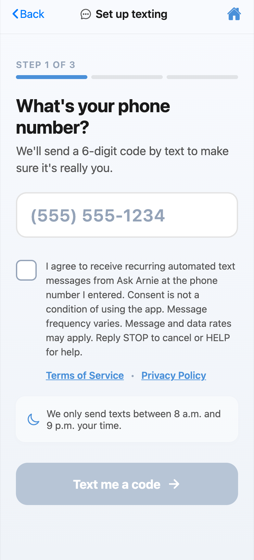
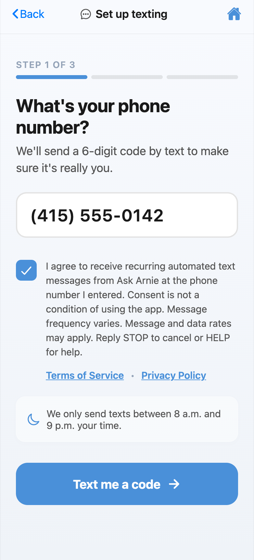
- Enter your own mobile number and check the consent box (it is unchecked until you check it). The screen discloses that messages are recurring and automated, that consent is not a condition of using the app, that message frequency varies, that message and data rates may apply, and that you can reply STOP to cancel or HELP for help.
- We text a one-time 6-digit code to that number. Texting turns on only after you type the code back into the app, proving the number is yours.
What you may receive
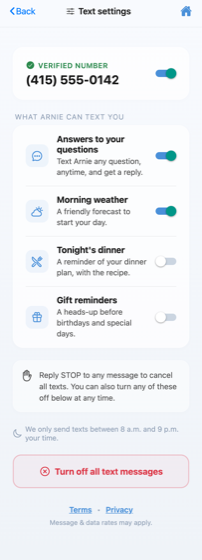
- Replies to questions you text to Arnie
- A morning weather note (if you turn it on)
- Meal-plan and recipe reminders (if you turn them on)
- Reminders ahead of birthdays and gift dates you saved (if you turn them on)
Message frequency varies based on the options you choose — typically a few messages per week. Message and data rates may apply.
How to stop or get help
- Reply STOP to any message to cancel all texts. You may receive one final message confirming you have opted out. Text START to rejoin later.
- Reply HELP to any message for help.
- You can also turn off all texts, or any single message type, in the app under Settings → Text settings, or email support@askarnie.app.
Privacy
No mobile information will be shared with third parties or affiliates for marketing or promotional purposes. See our Privacy Policy and Terms of Service for the full details of the program.